Factory Default Reset
Reset the device factory default values via software in System > Maintenance > Default reset.
Follow the instructions below 2N LTE Verso to reset the factory default values via hardware:
Factory Default Reset
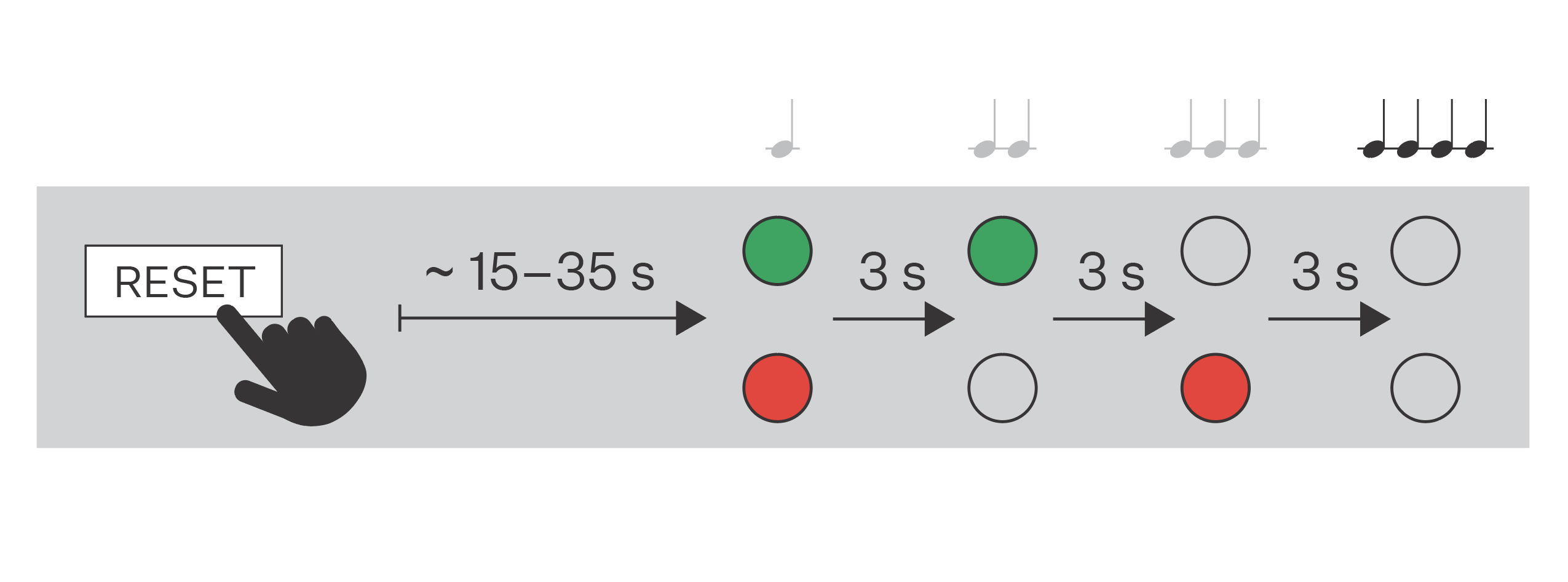
Press the button RESET and keep it pressed.
Wait until the red and green LEDs go on simultaneously on the device and the acoustic signal can be heard
 (approx. 15–35 s).
Wait until the red LED goes off and the acoustic signal can be heard
 (approx. for another 3 s).
Wait until the green LED goes off and the red LED goes on again and the acoustic signal can be heard
 (approx. for another 3 s).
Wait until the red LED goes off and the acoustic signal can be heard
 (approx. for another 3 s).
Release the RESET button.
Caution
In case the factory default values are reset on the device with a firmware version 2.18 or higher, it is necessary to reprogram the 2N Security Relay using the instructions given in Security Relay.