Dormakaba - My Dormakaba lock stopped working - What can you check?
An installor came and onboarded a Dormakaba locks in my My2N site. Everyting is working fine and suddenly, the lock stopped working.
What can I do?
The 1st thing to do is to verify your device in My2N site and check what are its statuses:
Is it Online?
Is the battery level sufficient?
The Wi-Fi signal is it strong enough?
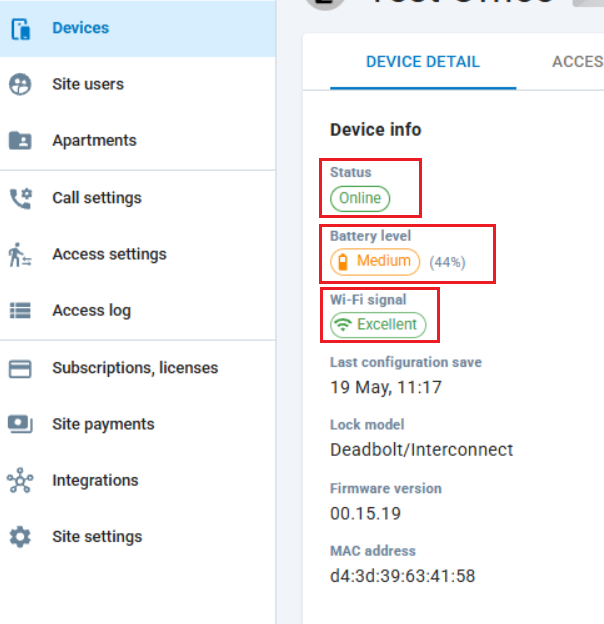
In case the device is Offline, run those tests :
-
**1# → Internet Connectivity?
Blue/Red = NO, Blue/Green = YES -
**2# → See any Wi‑Fi/AP in range?
Blue/Red = NO, Blue/Green = YES -
**5# → Wi‑Fi module communication?
Blue/Green = YES, Blue/Red = NO
If the results are negative or/and the device does not respond, verify the batteries:
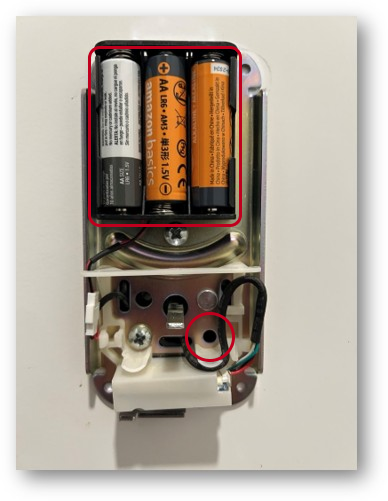
Eventually replace them and make sure you have 3 similar AA alkaline batteries.
If the signal is weak, verify with your ISP if the minimum requirements are still fulfilled:
-
2.4 GHz Network (802.11 b/g/n) ONLY
-
VLAN
-
Multi-Cast Traffic Filters Enabled
After all those verifications, if you did not succeed to make the locks work again, contact us reporting an issue from the App or from our site, directly with this Link