FAQ describes how to set 2N SmartCOM PRO ETH for AMS function. 2N SmartCOM PRO ETH with this function can reads data using M-Bus interface automatically and store data in internal memory.
Firmware which supports this feature for 2N SmartCOM PRO ETH is SCE_1-12-0-12-24 or higher, this FW is distributed on request, please ask 2N.
FAQ shows an example with electricity meter INEPRO PRO 380-M with M-Bus support
Unit can be configured via hyperterminal tool (e.g. putty) or software 2N SmartCom terminal config
ati3 - Check firmware version

(Primary address of electricity meter = 1, secondary address = 15020416, baudrate=2400, databits=8, stopbits=1, parity=even)
at^scport2="BAUDRATE",2400
at^scport2="DATA_BITS",8
at^scport2="STOP_BITS"",1
at^scport2="PARITY",1
at^scport2="SRESTART" - Save configuration and restart port
at^scport2? - Show actual port settings

AMS AT commands:
Primary address:
(meter´s primary address = 1)
at^scams=? - Display available commands for AMS and parameters of these commands

at^scams? - Show added devices and AMS function settings

at^scams="enable",1 - Enable AMS function (0 = AMS turned off)

at^scams="dev_add",2,"MBUS","1@2400","1M" - Add meter do AMS table
Where: 2 - M-Bus port of 2N SmartCOM PRO unit
"MBUS" - protocol for communication
"1@2400" - primary address and baudrate
"1M" - time interval. Supported time interval: "1M", "2M", "3M", "4M", "5M", "6M", "10M", "12M", "15M", "20M", "30M", "1H", "2H", "3H", "4H", "6H", "8H", "12H", "1D"

at^scams="dev_remove",1-32 - Remove device from defined position
at^scams="dev_clear" - Delete all devices from AMS table
Primary addresses 254 a 255:
The address 254 (FEh) and 255 (FFh) are used to transmit information to all participants (Broadcast). With address 255 none of the slaves reply, and with address 254 all slaves reply with their own addresses. The latter case naturally results in collisions when two or more slaves are connected, and should only be used for test purposes.
Quotation: http://www.m-bus.com/mbusdoc/md5.php
at^scams="direct_read",2,"MBUS","254@2400" - one time jednorázové vyčtení bez uložení do paměti jednotky 2N SmartCOM PRO

at^scams="dev_add",2,"MBUS","254@2400","1M" - AMS vyčítání na adrese 254
Secondary address:
(secondary address of electricity meter = 15020416) Some devices support only primary addresses. Secondary address is always eight digit long.
A) use AT command for detecting connected M-Bus devices
AT^SCAMSADD=<PORT>,<PROTOCOL>,<BAUDRATE>,<INTERVAL>,<NUMBER_OF_EXPECTED_DEVICES>
AT^SCAMSADD=2,"MBUS",2400,"1M",1
^SCAMSADD: 65286,1,"1,15020416"
Unit 2N SmartCOM PRO ETH detected 1 meter with secondary address 15020416 and add this device to the table.
B) use SMS for detecting connected M-Bus devices
send SMS in the form:
SC AMSADD PWD=<password> QTY=<n> PORT=<port> PROTOCOL=<protocol> INT=<interval> [BAUDRATE=<baudrate>] BAUDRATE is optional

C) add device manually to AMS - secondary address is known
AT^SCAMS="DEV_ADD",2,"MBUS","*15020416@2400","1M"
Where: 2 - M-Bus port of unit 2N® SmartCOM PRO
"MBUS" - protocol for communication
"*15020416@2400" - secondary address and baudrate
"1M" - time interval. Supported time interval: "1M", "2M", "3M", "4M", "5M", "6M", "10M", "12M", "15M", "20M", "30M", "1H", "2H", "3H", "4H", "6H", "8H", "12H", "1D"

D) add device manually to AMS - with "wild cards".
-
Wild cards - you can use letter "F" in secondary address of meter (it can cause collisons at bus)
Secondary address for meters in range between 150204700 and 15020499 with default baud speed 2400 Bd: "*150204FF@2400"
AT^SCAMS="DEV_ADD",2,"MBUS","*150204FF@2400","1M"

One time readout, do not stored data to 2N SmartCOM PRO internal memory (direct_read):
-
works for primary and secondary address
at^scams="direct_read",2,"Mbus","1@2400"
Where: 2 - M-Bus port of unit 2N SmartCOM PRO
M-Bus - protocol for communication
1@2400 - address and baudrate

Read data from internal memory of 2N SmartCOM PRO (at^scdata):
at^scdata=? - Return available commands for at^scdata
"MESS_CNT" - Number of saved messages in memory of 2N SmartCOM PRO unit
"GET_SPACE" - Available memory in bytes
"GET_OLDEST" - Listing of oldest message
"GET_FILTERED" - Listing messages by applied filter
"DEL_OLDEST" - Delete oldest message
"DEL_ALL" - Delete all saved messages
Example:
AT^SCDATA?
AT^SCDATA="GET_OLDEST",18
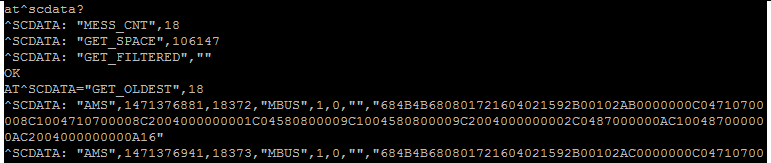
Original format of M-Bus message:
^SCDATA: "AMS",1471376881,18372,"MBUS",1,0,"","684B4B680801721604021592B00102AB0000000C04710700008C1004710700008C2004000000001C04580800009C1004580800009C2004000000002C0487000000AC100487000000AC2004000000000A16"
Format of M-Bus message:
^SCDATA:<type_of_record>,<time_stamp>,<sequential_number>,<protocol>,<index>,<error_code>,<device_identification>,<data>
<type of record> - typ of record - AMS
<time_stamp> - time mark
<sequential_number> - sequential number of saved record
<protocol> - name of protocol
<index> - index of device from table of devices
<error_code> - number 0 = without error
<device_identification> - not used in M-Bus
<data> - raw data