-
In firmware 1.16.2.19.3 there has been developed SMS control feature, available in Messaging -> Control. In SMS control you will find AutoCLIP records for SMSs and information about incoming and outgoing SMS queues. This FAQ explains how the particular queue works.
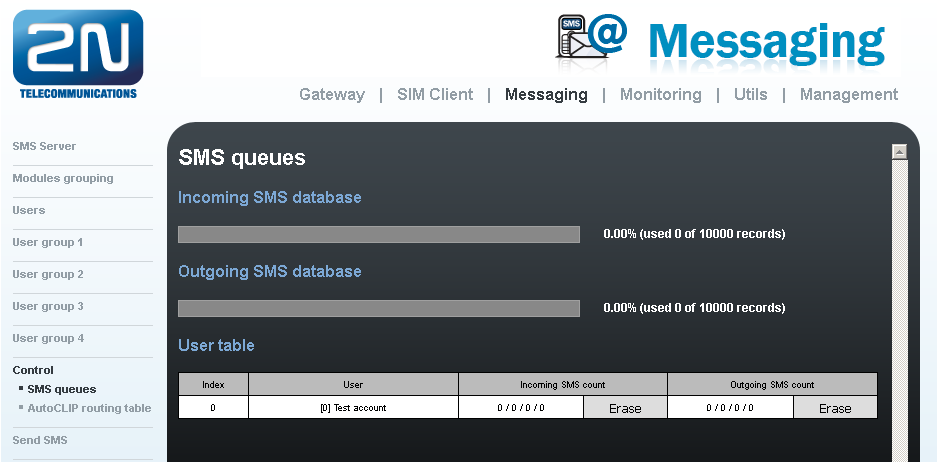
Incoming SMS count
W / X / Y / Z
-
W - Received - Count of received SMS messages
-
X - Ack OK - Count of received receipts with status OK (received)
-
Y - Ack error - Count of received receipts with status FAIL (SMS wasn't received)
-
Z - Failed - Count of incoming messages which indicates an error during sending (incorrect number, network error)
Outgoing SMS count
A / B / C / D
-
A - Waiting - Count of SMS waiting to be sent
-
B - Sending - Count of SMS currently processed to send
-
C - Sent - Count of sent SMS waiting for receipt (deliver confirmation)
-
D - Not complete – count of long incomplete SMS waiting for more parts from SMPP.
|
Not complete column for outgoing SMS count in User table indicates number of parts of original message sent via SMPP which are currently queued to be send |
Example of outgoing message with receipt
-
0/0/0/0 + 0/0/0/0 - no SMS
-
0/0/0/0 + 1/0/0/0 - SMS is waiting to be sent
-
0/0/0/0 + 0/1/0/0 - SMS has been sent, waiting for receipt
-
final state:
-
0/1/0/0 + 0/0/1/0 - SMS sent, receipt received - delivered
-
0/0/1/0 + 0/0/1/0 - SMS sent, receipt received - not delivered
-
0/0/0/1 + 0/0/1/0 - SMS sending failed, error during sending (incorrect number, network error)
-