|
Mode As recommended, leave the intercom in automatic mode, the My2N won't re-write the manually created user. |
Create users manually
| It requires more knowledge of 2N OS. |
-
do not create any ring group (users won't be automatically created in the intercom's directory)


-
locate the device ID (phone number) for each user

-
use remote configuration service (or connect locally using the IP address of the intercom) and open the device's web interface

-
navigate to section Directory > Users
-
create separate users and use the Device ID as their phone numbers with the correct format "deviceID"/2 (e.g. 4901571323/2). You can add up to 3 phone numbers and then an User Deputy (3) if needed:
In Old Web Interface:
 In New Web Interface:
"deviceID"/2 are made with this following id from My2N platform :
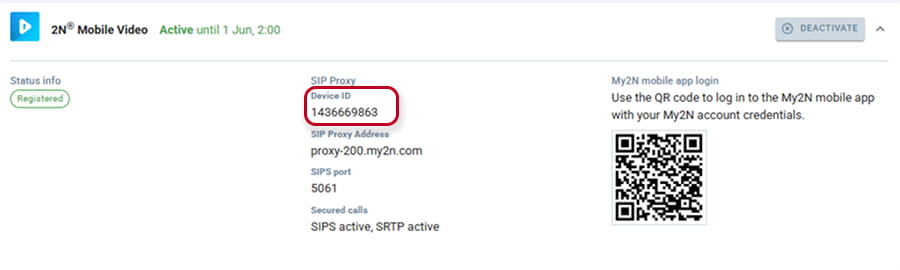
Cascade calls support different types of phone numbers, you can, under the same user use local calls syntax (device:xxxxxxxxxx), SIP calls syntax (sip:192.168.17.xx) or sip proxy calls syntax like for my2n (1436669863/2 , behind slash sign is the number of the used SIP Account)