Lift IP 2.0 factory reset
Lift IP 2.0 – Factory reset procedure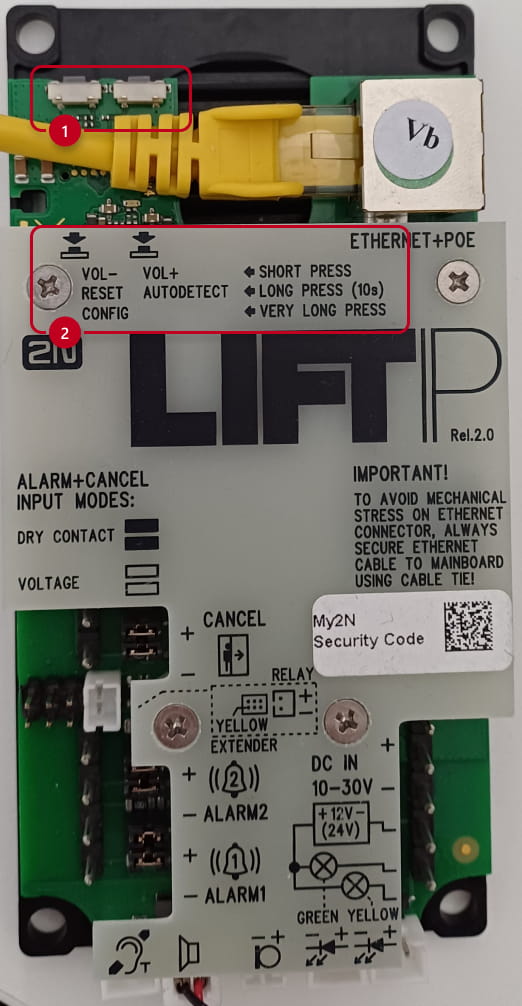
As you can see, there are 2 button on the top of the PCB Lift IP 2.0 – marked
by frame 1
And function of these buttons is described on the PCB cover – marked by
frame 2
Follow the instructions below to reset the factory default values:
1 - Press and hold the RESET button.
2 - Wait until the red and green LEDs go on simultaneously and the
acoustic signal can be heard single beep tone (approx. 30 s).
3 - Wait until the red LED goes o and the acoustic signal can be heard
double beep tone (approx. for another 3 s).
4 - Wait until the green LED goes o and the red LED goes on again and
the acoustic signal can be heard triple beep tone (approx. for another
3 s).
5 - Wait until the red LED goes o and the acoustic signal can be heard
quadruple beep tone (approx. for another 3 s).
6 - Release the RESET button immediately.
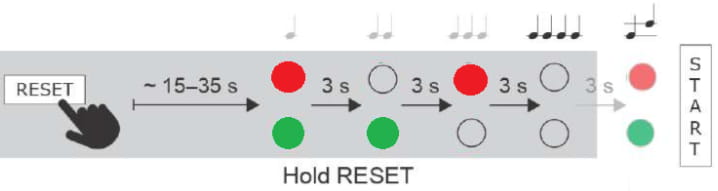
Now is Lift IP 2.0 communicator set in default values, and should obtain an IP address from DHCP.
Login via web GUI:
admin / 2n