Requirements
-
gateway supporting FAX transmission, check backside label whether "FAX" is included in gateway´s name.
-
SIM card with active fax service
-
SIM card with multiple numbers - one for voice, one for fax
-
GSM provider supporting protocol T30 for fax transmission
Problems with incoming fax message (from PSTN to 2N EasyGate)
Follow instructions and send answers to Technical Support
-
What is the percentage of successful incoming fax messages?
-
How is the yellow LED diode blinking during receiving fax messages?
-
(third LED diod on 2N EasyGate - Telephone Line indication, see manual page 6)
-
Are you using G3 FAX connected to FXS port or PC FAX via COM port?
-
Is your SIM card activated in Multinumbering scheme? (manual page 14)
-
Send us your configuration file
-
Follow the instructions below and send us the result
-
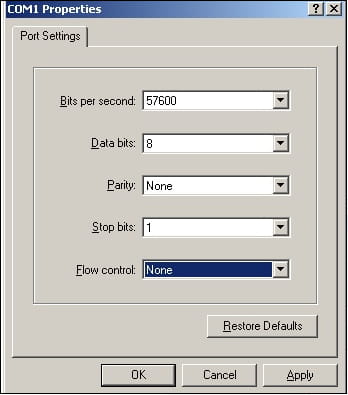
Open HyperTerminal application. Choose COM port and connect the gateway to the PC via serial RS232 interface. Set these properties: 57600, 8, None,1,None
-
Use these commands:
at+fclass=1
atdX (X is a fax number)
-
Send the response of these commands to us.
Problem with outgoing fax message (from 2N EasyGate to PSTN)
Follow instructions and send answers to Technical Support
-
What is the percentage of successful outgoing fax messages?
-
How is the yellow LED diode blinking during sending fax messages?
-
(third LED diod on 2N EasyGate - Telephone Line indication, see manual page 6)
-
Did you use prefix *01* for fax calling before dialling number? (manual page 14)
-
Are you using G3 FAX connected to FXS port or PC FAX via COM port?
-
Is your SIM card activated in Multinumbering scheme? (manual page 14)
-
Send us your configuration file.
-
Follow the instructions below and send us the result.
-
Open HyperTerminal application. Choose COM port and connect the gateway to the PC via serial RS232 interface. Set these properties: 57600, 8, None,1,None

-
Use these commands:
at+fclass=1
atdX (X is a fax number)
-
Send the response of these commands to us.