Brief Guidelines
Device Static/Dynamic IP Address Switching with Speed Dial Button
Take the following steps to reset the network settings and switch the static IP address (DHCP OFF) / dynamic IP address (DHCP OFF) mode in the device network configuration:
Connect the device to the power supply (if connected, disconnect and reconnect it).
Press the Speed dial button 15 times on the main unit.
Note
After the static address mode is switched on, the basic network parameters are reset to the following default values:
IP address: 192.168.1.100
Network mask: 255.255.255.0
Default gateway: 192.168.1.1
Factory Default Reset with RESET Button
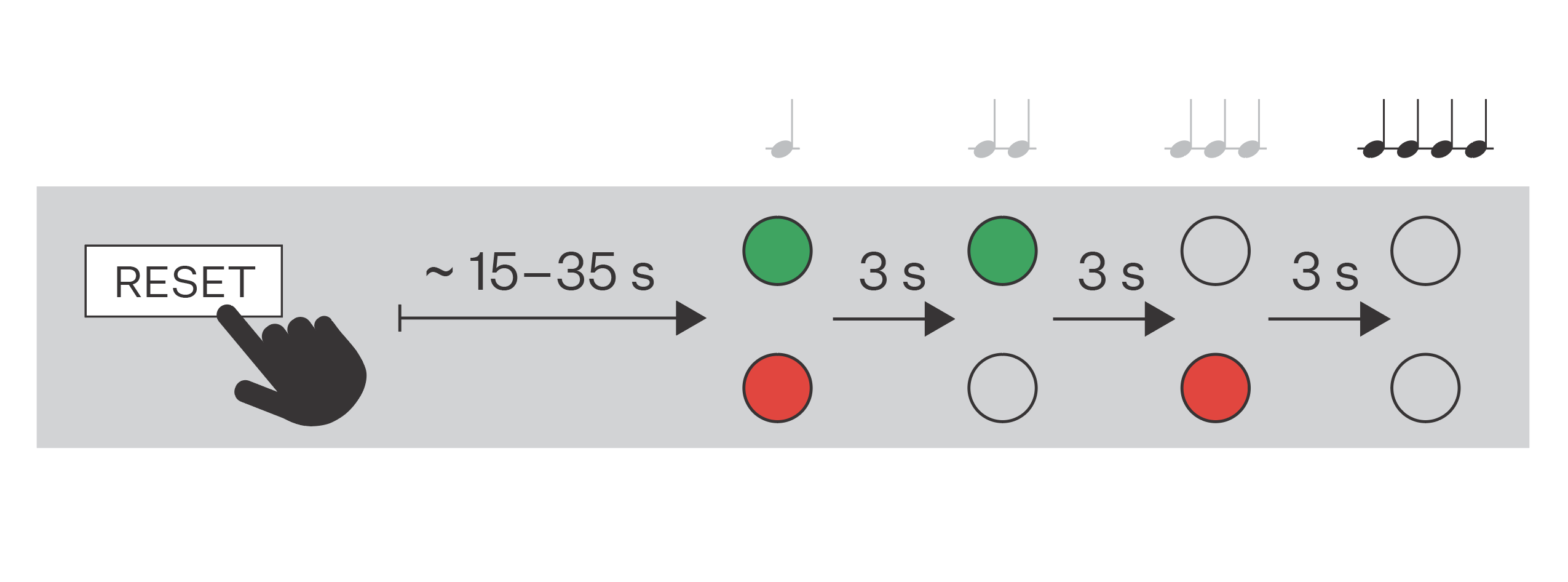
Press the button RESET and keep it pressed.
Wait until the red and green LEDs go on simultaneously on the device and the acoustic signal can be heard
 (approx. 15–35 s).
Wait until the red LED goes off and an acoustic signal can be heard
 (approx. for another 3 s).
Wait until the green LED goes off and the red LED goes on again and an acoustic signal can be heard
 (approx. for another 3 s).
Wait until the red LED goes off and the acoustic signal can be heard
 (approx. for another 3 s).
Release the RESET button.