Product Support 2N IP Solo
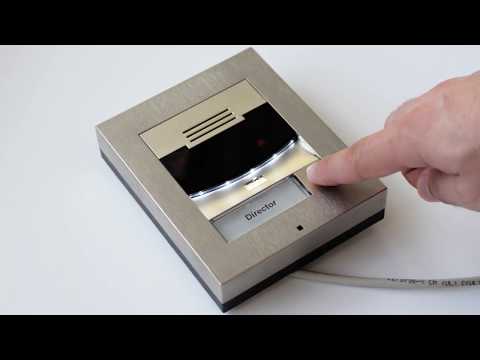
A compact IP intercom, ideal for Home Automation

Apps & Software
| File Name | Category | Type | |||||||
|---|---|---|---|---|---|---|---|---|---|
| Software 1.1.7 - 2N IP Eye | Software and Firmware | Software | |||||||
Version 1.1.7.0.0 includes the following changes: Corrections: Switch unlocking in the bistable mode Compatibility with the Korean localization of Windows 7 Adjusted fps configuration Security update of the Apache log4net version 2.0.12 The application requires PowerShell 5.0 to work correctly where the latest 2N IP Eye version is installed on Windows 7 PCs. Make sure that it is installed in your PC unless installed before. The 2N IP Eye version 1.1.7.0.0 is also compatible with Windows 10, and Windows 11. |
|||||||||
| Software 3.0.9 - 2N Network Scanner | Software and Firmware | Software | |||||||
|
|||||||||
Firmware
| File Name | Category | Type | |||||||
|---|---|---|---|---|---|---|---|---|---|
| Firmware 2.50.1 - 2N IP Verso, Solo, LTE Verso | Software and Firmware | Firmware | |||||||
2N OS version 2.50.1 for 2N Intercoms includes the following changesEssential Corrections
2N OS version 2.50.0 for 2N Intercoms includes the following changesPrecautions to be taken during update to FW version 2.50.x
New Functions and Improvements
Essential Corrections
c2681f75d7f78274e2e8eb84938d3a618d3147d033947428c0c946c92adb7fe4
|
|||||||||
| Firmware 2.50.0 - 2N IP Verso, Solo, LTE Verso | Software and Firmware | Firmware | |||||||
2N OS version 2.50.0 for 2N Intercoms includes the following changesPrecautions to be taken during update to FW version 2.50.x
New Functions and Improvements
Essential Corrections
7c9d1eb3ad0ef35f2bb432859f0dd0c9fa1d50ac8347940d4c3a79a6b35207bc
|
|||||||||
| Firmware 2.49.1.80 - 2N IP Verso, Solo, LTE Verso - 2N Fortis support | Software and Firmware | Firmware (2N Fortis support), Firmware | |||||||
2N OS version 2.49.1 for 2N Intercoms includes the following changesEssential Corrections
2N OS version 2.49.0 for 2N Intercoms includes the following changesPrecautions to be taken during update to FW version 2.49.x
New Functions and Improvements
Essential Corrections
ee2c8c7fb50d03c3ae30e8c2d50d8b4c7d5f678668b2c1fa013d03ead1070a06
|
|||||||||
| Firmware 2.49.1.75 - 2N IP Verso, Solo, LTE Verso | Software and Firmware | Firmware | |||||||
2N OS version 2.49.1 for 2N Intercoms includes the following changesEssential Corrections
2N OS version 2.49.0 for 2N Intercoms includes the following changesPrecautions to be taken during update to FW version 2.49.x
New Functions and Improvements
Essential Corrections
e8650293f23e12a5d5514e5e256e01eea98999919c5c5985728f73b673e67536
|
|||||||||
| Firmware 2.48.0 - 2N IP Verso, Solo, LTE Verso - 2N Fortis support | Software and Firmware | Firmware, Firmware (2N Fortis support) | |||||||
2N OS version 2.48.0 for 2N IP Access Control Systems includes the following changesPrecautions to be taken during update to FW version 2.48.x
New Functions and Improvements
Essential Corrections
05354ba17f60dbcf64ecb7538e00bb99370191e4e0bdd353dba696ceb1faf399
|
|||||||||
| Firmware 2.48.1 - 2N IP Verso, Solo, LTE Verso | Software and Firmware | Firmware | |||||||
2N OS version 2.48.1 for 2N Intercoms includes the following changes
|
|||||||||
Other Documents
| File Name | Category | Type | |||||||
|---|---|---|---|---|---|---|---|---|---|
| 2N Catalogue for Planners 2026 (EN) | Marketing | Catalogue | |||||||
|
|||||||||
| CAD drawings intercoms | Technical | CAD and BIM | |||||||
|
|||||||||
| BIM objects intercoms (EN) | Technical | CAD and BIM | |||||||
|
|||||||||
| A&E specifications IP Solo | Technical | A&E Specifications | |||||||
|
|||||||||
| 2N Repainting Guide | Technical | Manual | |||||||
|
|||||||||
| Firmware 2.50.1 - 2N IP Verso, Solo, LTE Verso | Software and Firmware | Firmware | |||||||
2N OS version 2.50.1 for 2N Intercoms includes the following changesEssential Corrections
2N OS version 2.50.0 for 2N Intercoms includes the following changesPrecautions to be taken during update to FW version 2.50.x
New Functions and Improvements
Essential Corrections
c2681f75d7f78274e2e8eb84938d3a618d3147d033947428c0c946c92adb7fe4
|
|||||||||
| Nametags Print Template - 2N IP Verso, Solo | Other | ||||||||
|
|||||||||
| Firmware 2.50.0 - 2N IP Verso, Solo, LTE Verso | Software and Firmware | Firmware | |||||||
2N OS version 2.50.0 for 2N Intercoms includes the following changesPrecautions to be taken during update to FW version 2.50.x
New Functions and Improvements
Essential Corrections
7c9d1eb3ad0ef35f2bb432859f0dd0c9fa1d50ac8347940d4c3a79a6b35207bc
|
|||||||||
| 2N Product Catalogue (EN) | Marketing | Catalogue | |||||||
|
|||||||||
| Presentation (EN) - 2N IP Intercoms | Marketing | Presentations | |||||||
|
|||||||||
| Firmware 2.49.1.80 - 2N IP Verso, Solo, LTE Verso - 2N Fortis support | Software and Firmware | Firmware (2N Fortis support), Firmware | |||||||
2N OS version 2.49.1 for 2N Intercoms includes the following changesEssential Corrections
2N OS version 2.49.0 for 2N Intercoms includes the following changesPrecautions to be taken during update to FW version 2.49.x
New Functions and Improvements
Essential Corrections
ee2c8c7fb50d03c3ae30e8c2d50d8b4c7d5f678668b2c1fa013d03ead1070a06
|
|||||||||
| Declaration of Conformity (EN) - 2N IP Solo | Technical | Declaration of Conformity | |||||||
|
|||||||||
FAQ
- 2N 2Wire - Installation and Configuration
- 2N IP Eye issue - How to enable 2N IP Eye in Windows firewall?
- 2N IP intercoms, Access Units, IP audio units - Firmware upgrade
- 2N IP Intercoms - Diagnostics and Troubleshooting
- 2N IP Intercoms - External IP camera connection (Axis IP camera guide included)
- 2N IP Intercoms - Factory reset
- 2N IP Intercoms - IP Address retrieval
- 2N IP Intercoms - User sounds uploading
- 2N IP Intercoms – Integration with 3rd party NVR/VMS systems without ONVIF and RTSP
- 2N Network Scanner - Locating 2N devices in the network
- 2N Student Monitoring System with 2N IP Intercoms
- 2N VoiceBlue Next GSM gateway - How to configure it with 2N IP intercoms?
- Access key - How to configure on the Indoor Touch
- Access logs of 2N Mobile Key
- Automation, Black/whitelist - How to block or allow specific numbers to call an intercom
- Automation, Call Delay - how to set a different ring time for diferent call destinations
- Automation, Calling two numbers from 2N IP Intercom over GSM gateway with a single SIM card
- Automation, Calling two numbers from 2N IP Intercom over GSM gateway with a single SIM card
- Automation, DoorOpenTooLong - Securing door against excessively long opening on 2N IP Intercoms
- Automation, Multicast - Configuring Lock/Unlock all feature on 2N IP Intercoms
- Automation, Multicast - How to receive multicast paging from up to 5 sources
- Automation, Multicast paging - How to configure paging from 2N IP Intercoms
- Automation, Multicast - Receiving multicast paging from up to 5 sources
- Automation, Silent Alarm - How to configure silent alarm on 2N IP Intercoms
- Automation, UnauthorisedDoorOpen - Securing doors against unauthorised door opening in 2N IP Intercoms
- Auto Provisioning via TFTP
- Axis Network I/O Relay - Controlling using HTTP commands
- Calling locally between 2N IP intercom and 2N IP Phone D7A
- Card reader gets stuck
- Certification for web authentication
- Communication between 2N Indoor Compact and 2N IP intercom via Device ID
- Communication via Device ID of 2N IP intercom
- Configuration of electrical outputs on 2N IP Intercoms
- Configuring email notification on 2N indoor Touch
- Configuring Wildix VoIP PBX with 2N IP Intercom
- Congifuring more unlock buttons in 2N Answering Units
- Connecting WaveStore VMS to 2N IP Intercom
- Connection and configuration of a door contact to 2N IP Intercom/Access Unit
- Connection of 2 devices to one lock
- Direct call without SIP Proxy registration
- Disabling the video preview with the 2N IP intercom outside the call?
- Door lock does not open after dialing 00
- Easy unlock and call hang in one step
- Electric locks in 2N IP Intercom accessories
- External IP Relay 9137410E & 9137411E - Controlling using HTTP commands from a 2N IP intercom or 2N Access Unit
- Gmail SMTP Service - How to configure with Intercom units
- Grandstream GXV3140 - How to set it up with a 2N IP Intercom
- Grandstream GXV3175v2 - How to set it up with a 2N IP Intercom
- Grandstream GXV3240 - How to set it up with a 2N IP Intercom
- Grandstream GXV3275 - How to set it up with 2N IP Intercom
- How to control 2N Indoor Touch via Automation of 2N IP intercom
- How to integrate 2N IP Devices with MS Teams
- How to provide all information to effectively resolve a technical issue with 2N OS device
- How to send/receive separate multicast streams on 2N IP Intercoms via Automation
- How to use Group Authentication / Access key in communication between 2N IP Intercoms and 2N Indoor Touch
- HTTP API - Configuration upload
- HTTP Commands – How to configure them in Answering units
- Integration the Grandstream HT801 with 2N IP Intercom
- Intergration Loxone Miniserver with 2N intercom
- Issues accessing the web interface on macOS
- KNX connectivity with 2N IP Intercoms
- Language mutation - How to create own language mutation for 2N IP Intercoms
- License - How to get a license for 2N IP Intercom
- License Plate Recognition (LPR)
- Management over the Internet
- MicroSIP - Direct call with 2N IP Intercom
- Milestone XProtect - Alarm event from 2N device on Milestone XProtect
- Milestone XProtect and 2N IP Intercom integration
- Milestone XProtect Smart Client - log operator's actions
- Milestone XProtect - Video Pop-up on 2N Device's Action
- Multicast Discovery function on 2N Indoor Touch 2.0
- Multicast Stream configuration with IP Audio Manager
- No video? Try to check the following solutions!
- OpenVPN server & client
- Password recovery in 2N OS devices
- REX button connectivity
- Setting up 2N IP Intercom with SNOM 760 phone
- Setting up call from a 2N IP intercom to a 2N Indoor Talk and vice versa
- Setting up calls from and to 2N IP intercom
- Setting up Grandstream GXV3672 for external camera for 2N IP Intercom
- Seznam SMTP service - How to configure with Intercom units
- SIP Proxy registration
- SIP Proxy registration on IP intercoms
- Starting manual for integration with 2N IP Intercoms
- Static IP address in 2N IP Intercoms
- Tamper switch - Location (installation) and configuration
- Time Profiles
- Troubleshooting basics – Configuration backup, network trace, syslog and ping tool on 2N IP Intercoms
- Vega LPR integration with 2N IP Intercoms and Access Units
- Video - 2N IP Intercom - How to switch between internal and external cameras using DTMF
- Video - 2N IP intercom - IP address, how to find it out and switch between DHCP and static modes
- Video - 2N IP intercoms - Calling multiple destinations in sequence and in parallel by pressing one button
- Video - 2N OS devices - Factory Reset procedure
- Video - Configuration of 2N IP intercom with 2N IP Eye
- Video issue - 2N IP Intercom does not send video during a call
- VLC media player - watch and record video from 2N IP Intercom
- Web interface access - 2N IP intercoms
Technical specifications
/
-
Buttons
- Button Design:
- transparent buttons with white backlight and easily removable label
- Number Of Buttons:
- 1
-
Audio
- Microphone:
- 1 built-in microphone
- Speaker:
- 2W/8 Ω
- Sound Pressure At 1KHz At 1M Distance:
- 78dB
-
Audio Stream
- Codecs:
- G.711, G.729, G.722, L16/16kHz
-
Camera (Optional)
- Resolution – JPEG:
- 1280 x 960px
- Resolution – Video Call:
- 640 x 480px
- Viewing Angle:
- 128° (H), 95° (V), 134° (D)
- Night Vision:
- yes
-
Video Stream
- Codecs:
- H.263, H.263+, H.264, MJPEG, MPEG-4
-
Interfaces
- Power Supply:
- 12V ± 15% / 2A DC, or PoE
- PoE:
- PoE 802.3af (Class 0 - 12.95W)
- LAN:
- 10/100BASE-TX with Auto-MDIX, RJ-45
- Switch Output:
- NC/NO contacts, 30V, 1A, AC, DC
- Active Switch Output:
- 8 to 12V, DC, PoE: 10V - adapter: source voltage minus 2V, max 400mA
- Tamper Switch:
- yes, inbuilt
- Supported Protocols:
- SIP2.0, DHCP opt. 66, ONVIF, SMTP, 802.1x, RTSP, RTP, TFTP, HTTP, HTTPS, Syslog
-
Mechanical Properties
- Operating temperature:
- -40 to 60°C
- Storage temperature:
- -40 to 70°C
- Operating relative humidity:
- (non-condensing) 10 - 95%
- Officially Certified Outdoor Coverage Level:
- IP54, IK08
-
Other
- Signalling protocol:
- SIP 2.0 (RFC - 3261)
-
Dimensions
- Frame for surface installation – 1 module:
- 107 (W) x 130 (H) x 28 (D)mm
- Frame for flush installation – 1 module:
- 130 (W) x 153 (H) x 5 (D)mm
Need to talk to someone?
Our team are here for you! Select your region or focus
Chat with a Technician
To contact our technician, please use the chat at the bottom of this page. No bots: speak with a real 2N technician using our live chat
Avaliable from 9 a.m. - 4:30 p.m. CET
Call Us
Available from 9:00 a.m. to 5:00 p.m. CET (Mon-Fri).
- General (Czech, English) +420 228 880 382
- United Kingdom +44 203 510 5770
- France +33 1 88 89 02 98
- Germany +49 4133 2029999
- Spain +34 919 540 607
- Italy +39 02 3055 9053
Contact Form
Fill out our technical support form and someone will be in touch as soon as possible
Contact for Americas technical support
Call Us
- General 1-800-444-2947
Support portal for 2N Distributors and CIP
Create and manage your technical cases.