2N IP intercoms, Access Units, IP audio units - Firmware upgrade
We always recommend having the latest firmware on your devices. This article will guide you through the upgrade procedure, even if you currently have a very old version.
The steps in this article require using the web interface of a 2N device. Please follow this manual in case this is your first time using the web interface.
Prerequisities
- 2N OS device (IP intercom, answering unit, or access unit)
- Internet connectivity for the 2N OS device in case of the online upgrade method
Feature properties
- The firmware upgrade does not delete your current configuration, but we recommend saving a backup configuration before starting. However, the process updates the configuration, which may render it incompatible with previous firmware versions.
- You can select from online and offline upgrade method.
- 2N OS device also checks the firmware file to prevent upload of a wrong or corrupted file.
Click here for instructions for firmware 3.0 and newer.
Read more about the differences in long-term support and active track 2N OS.
Firmware 2.50 and older (LTS)
Configuration backup
- Configuration backups from version 2.45.x and higher are incompatible with 2.44.x and lower.
- We recommend saving a backup configuration file before each upgrade.
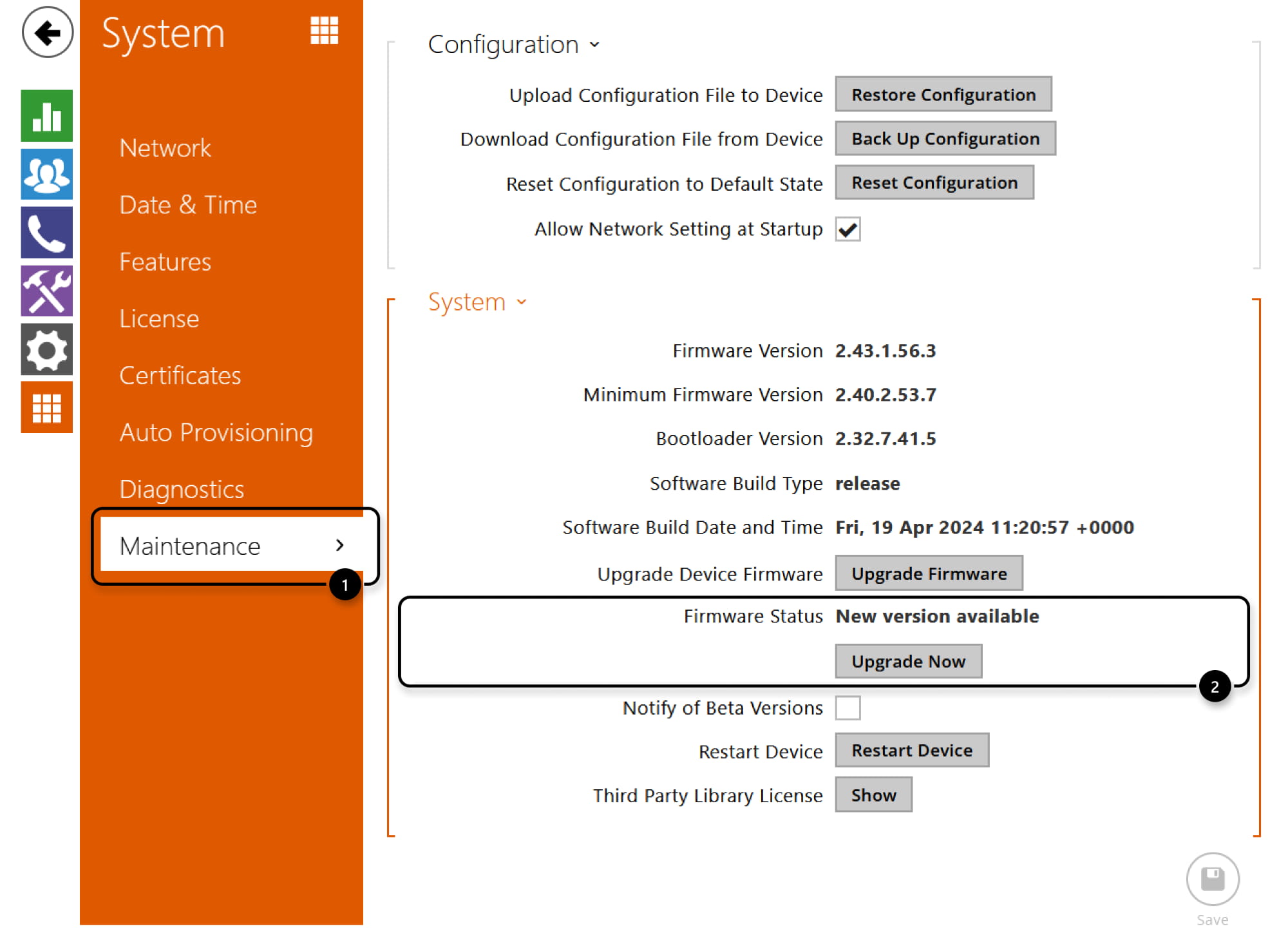
You can proceed it in System - Maintenance.

Online upgrade method
- 2N OS device can download the right latest firmware file by itself.
Just go to System - Maintenance and click on Upgrade Now button when the interom says that a new version is available. - In case the current firmware is too old, it will upgrade the intercom to the next "intermediary" version. Use this procedure multiple times until the interface informs you that you are running the latest firmware version.
In case you do not have Internet connection, follow the steps for offline upgrade.
- You can read release notes here. Click on Proceed to start the upgrade.
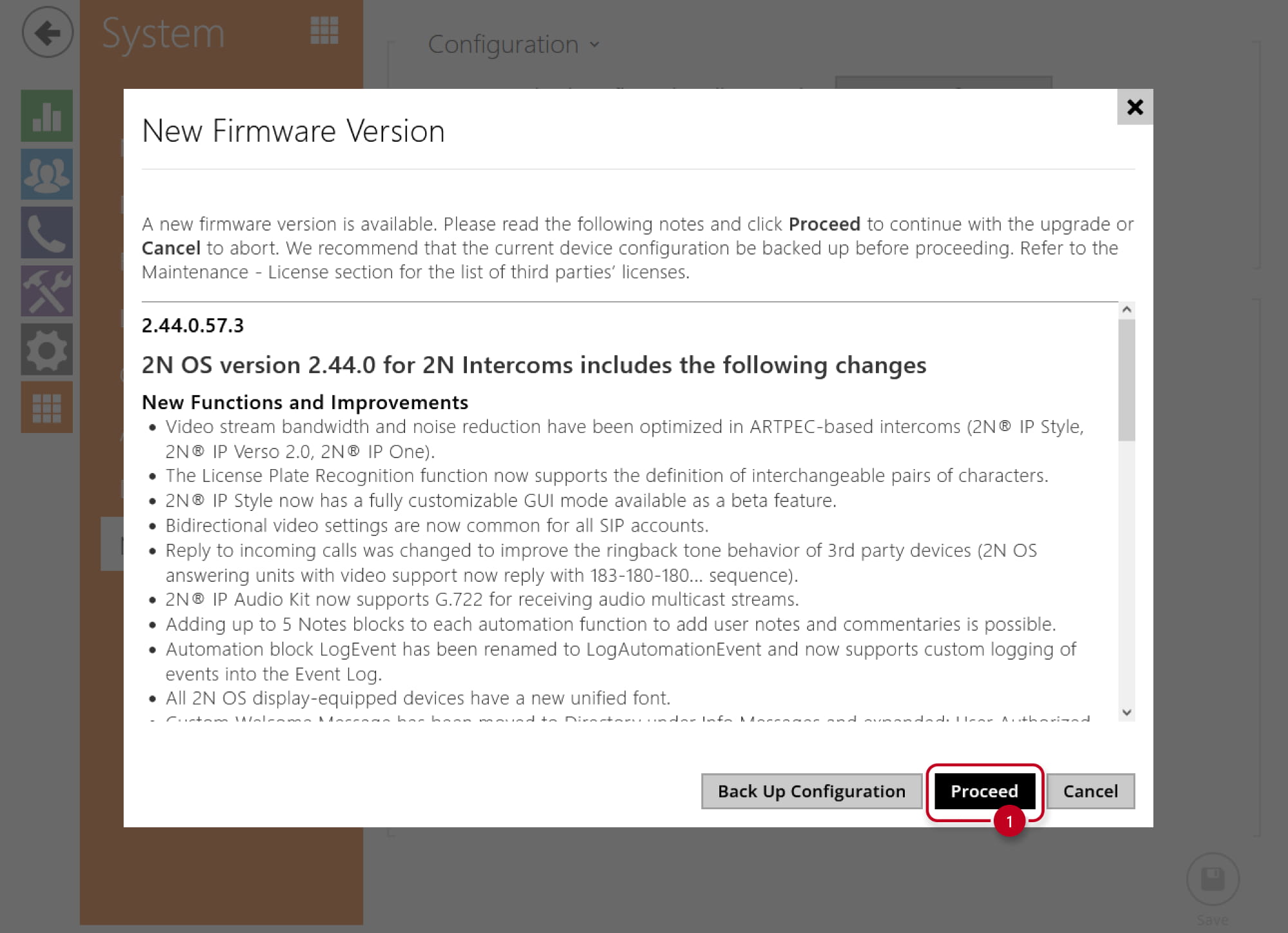
- 2N OS device will automatically get restarted and new firmware will then be available.
The whole update process takes less than a minute.

Offline upgrade method
Depending on which 2N OS device model you have, please follow one of these sequences:
- For IP Force, IP Safety and IP Vario:
-> 1.11.0 -> 1.16.1 -> 2.5.0 -> 2.9.1 -> 2.15.2 -> 2.17.1 -> 2.18.1 -> 2.31.1 -> 2.39.2 -> 2.44.0 -> the latest one - For IP Style, IP Verso 2.0, IP Force 2.0 and IP One:
-> 1.11.0 -> 1.16.1 -> 2.5.0 -> 2.9.1 -> 2.15.2 -> 2.17.1 -> 2.18.1 -> 2.31.1 -> 2.39.2 -> 2.42.0 -> the latest one - For all other 2N OS device models:
-> 1.11.0 -> 1.16.1 -> 2.5.0 -> 2.9.1 -> 2.15.2 -> 2.17.1 -> 2.18.1 -> 2.31.1 -> 2.39.2 -> the latest one
- All intermediary firmware versions for each 2N OS device can be downloaded here:
- 2N IP intercoms
- 2N Access Units
- 2N answering units
- 2N IP audio units
- Then use the offline upgrade method guided below.
- When you are on the last intermediary version, you can use the online upgrade method mentioned later as well.
Please note that some intercoms were launched later and thus some older firmware versions may not exist for them. Simply continue with the next higher version than it currently has.
- Go to System - Maintenance and click on Upgrade Firmware button.

- Select the firmware file and start the upgrade.


- The intercom will automatically get restarted and new firmware will then be available.
The whole update process takes less than a minute.
Downgrade firmware
- If needed, it is possible to downgrade the firmware version to the lower one by uploading the older firmware file.
- In version 2.24, the Directory structure was changed and downgrading from versions 2.24 and above to versions lower than 2.24 will delete your Directory.
- Downgrading from versions 2.x to versions 1.x is not supported.
- If you downgrade the firmware on new devices with Axis ARPTEC processor (e.g. IP Style, IP Verso 2.0, IP One, IP Force 2.0), it will delete the current configuration.

Firmware 3.0 and newer
Configuration backup
- Configuration backups from version 2.45.x and higher are incompatible with 2.44.x and lower.
- We recommend saving a backup configuration file before each upgrade.
You can proceed it in System - Maintenance.

Online upgrade method
- 2N OS device can download the right latest firmware file by itself.
Just go to System - Maintenance and click on Update button when the interom says that a new version is available. - In case the current firmware is too old, it will upgrade the intercom to the next "intermediary" version. Use this procedure multiple times until the interface informs you that you are running the latest firmware version.
In case you do not have Internet connection, follow the steps for offline upgrade.

- You can read release notes here. Click on Update to start the upgrade.

- 2N OS device will automatically get restarted and new firmware will then be available.
The whole update process takes less than a minute.
Offline upgrade method
Depending on which 2N OS device model you have, please follow one of these sequences:
- For IP Force, IP Safety and IP Vario:
-> 1.11.0 -> 1.16.1 -> 2.5.0 -> 2.9.1 -> 2.15.2 -> 2.17.1 -> 2.18.1 -> 2.31.1 -> 2.39.2 -> 2.44.0 -> the latest one - For IP Style, IP Verso 2.0, IP Force 2.0 and IP One:
-> 1.11.0 -> 1.16.1 -> 2.5.0 -> 2.9.1 -> 2.15.2 -> 2.17.1 -> 2.18.1 -> 2.31.1 -> 2.39.2 -> 2.42.0 -> the latest one - For all other 2N OS device models:
-> 1.11.0 -> 1.16.1 -> 2.5.0 -> 2.9.1 -> 2.15.2 -> 2.17.1 -> 2.18.1 -> 2.31.1 -> 2.39.2 -> the latest one
- All intermediary firmware versions for each 2N OS device can be downloaded here:
- 2N IP intercoms
- 2N Access Units
- 2N answering units
- 2N IP audio units
- Then use the offline upgrade method guided later.
- When you are on the last intermediary version, you can use the online upgrade method mentioned later as well.
Please note that some intercoms were launched later and thus some older firmware versions may not exist for them. Simply continue with the next higher version than it currently has.
- Go to System - Maintenance and click on Firmware upload button.

- Select the firmware file and start the upgrade.


- The intercom will automatically get restarted and new firmware will then be available.
The whole update process takes less than a minute.
Downgrade firmware
- If needed, it is possible to downgrade the firmware version to the lower one by uploading the older firmware file.
- In version 2.24, the Directory structure was changed and downgrading from versions 2.24 and above to versions lower than 2.24 will delete your Directory.
- Downgrading from versions 2.x to versions 1.x is not supported.
- If you downgrade the firmware on new devices with Axis ARPTEC processor (e.g. IP Style, IP Verso 2.0, IP One, IP Force 2.0), it will delete the current configuration.
- In case the device is on firmware version 2.47 and higher, it is not possible to downgrade the firmware below version 2.47.