Factory reset - jumpers:
-
disconnect 2N SmartCom PRO from the power supply
-
loosen the screws and remove the upper part of the case
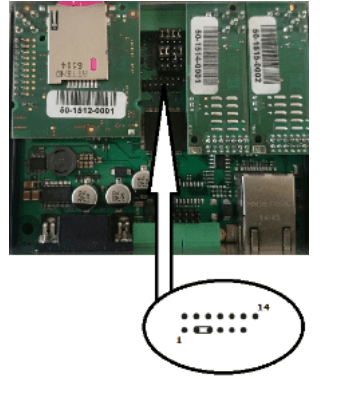
-
connect the jumper as shown in the figure above (Interconnect pins 3 and 5)
-
now reconnect the power supply. Upon power up, the Flash memory is deleted and the factory default values are reset for all ports
-
remember to remove the jumper to avoid deletion of the settings upon every start!
Factory reset - AT command:
at^scfres
-
following command make the software factory reset. The command only sets the default parameters without deleting the Flash and EEPROM data memories.
Factory reset - SMS:
SC FRES PWD=<password>
-
send SMS to initiate the terminal factory reset.
-
you will get a response SMS - "Factory Reset Initialized" and the command will be executed