To make a scheduled announcement, proceed the following steps (this setting was made in FW version 1.3.9.78.21):
-
In Audio Sources - create a playlist which will consist of the message, announcement, music file(s) which you want to play at the scheduled time

-
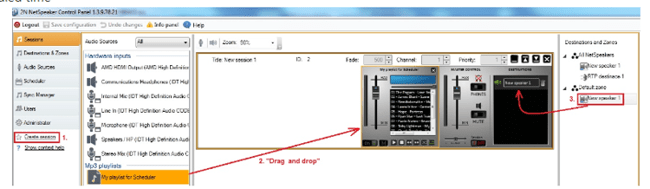
In Sessions - create new session, insert the playlist with announcements into this session (from previous step) and on the right side add a destination where the announcement should be played at the scheduled time
-
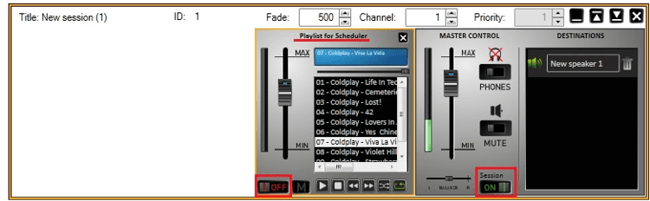
Start the session by pressing the PLAY button. The playlist then starts playing, so click the STOP button ON THE PLAYLIST, not on the session. Now the playlist in active session is ready to play using the Scheduler
-
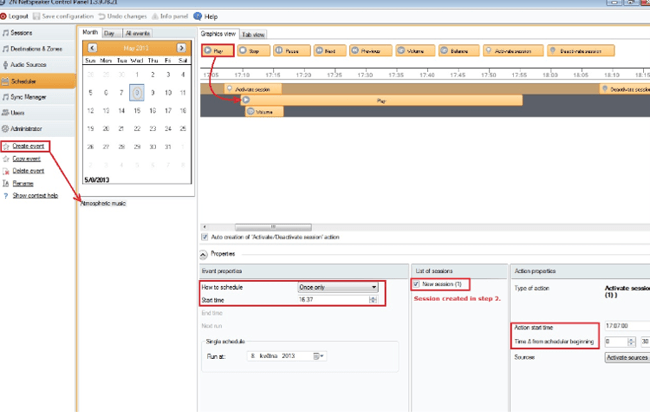
Drag the PLAY icon and drop it on the Session below. When you drop it, you may shift it to the time that you want - this will modify the DELTA TIME in Action properties (on top right side of the screen)
-
click on Save configuration In Scheduler - click on CREATE EVENT and enter the START TIME
-
-
Now wait for the scheduled time and at that time will be the Announcement played